





About this app
Claude is a generative AI assistant developed by Anthropic. It uses Anthropic’s Claude family of large language models to understand natural-language instructions and help with writing, research, analysis, coding, learning, document work, and many other tasks.
Claude works primarily through conversation: you type or speak what you need, provide files or other context when necessary, and Claude generates a response or completes supported tasks.
2. Purpose
Claude is designed to act as a general-purpose AI assistant for both everyday and professional work. Users can ask questions, get explanations, write and edit content, analyze information and files, research topics, solve problems, write code, and create work products.
Its capabilities extend beyond basic text chat. Claude can work with images and documents, search the web for current information, execute code in supported workflows, generate files, use connected services, and perform more complex multi-step work.
3. Main Features
Claude’s major capabilities currently include:
- AI chat and writing: Ask questions, brainstorm ideas, draft or rewrite content, summarize information, translate text, and receive detailed explanations.
- File and image understanding: Upload documents, images, and other supported files for Claude to analyze.
- Web Search: Claude can search the live web when current information is needed and provide source citations.
- Research: On paid plans, Claude can conduct multiple searches, investigate different aspects of a question, and produce more detailed research with citations.
- Projects: Users can organize related chats and knowledge into projects. Claude’s RAG system can expand project knowledge capacity when large amounts of material are added.
- Artifacts: Claude can create standalone content such as documents, code, diagrams, and interactive outputs that users can work with separately from the conversation.
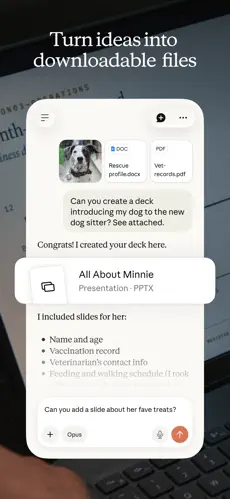
- Code and file creation: Claude can write and execute code in supported environments and create files such as documents, presentations, and spreadsheets.
- Voice Mode: Users can speak naturally with Claude and hear spoken responses. Voice Mode is currently a beta feature available across Free and paid plans.
- Claude Code: A specialized Claude experience for software development and coding workflows, included with several paid subscriptions.
- Claude Cowork: A paid-plan feature that brings Claude’s more agent-like capabilities to knowledge work and can perform multi-step tasks.
- Connectors and integrations: Claude can work with supported external tools and workplace services, depending on the user’s plan and configuration.
Some newer Claude capabilities remain in beta or research preview, meaning their availability and behavior can change.
4. Uses
Claude can be useful for many types of work. For example, users can have it explain difficult subjects, summarize long documents, create study notes, brainstorm ideas, draft articles and emails, improve grammar, analyze data, research topics, write or debug software, review uploaded files, prepare reports and presentations, organize information, and assist with business or professional tasks.
Because Claude supports live web search, it can also answer questions requiring current information rather than relying exclusively on knowledge learned during model training.
5. Who Can Use It?
Students can use Claude for explanations, study guides, brainstorming, research assistance, practice questions, and summarizing educational material. Students should still verify important facts and follow their school’s rules regarding AI-generated work.
Content creators can use it for brainstorming, outlines, scripts, captions, editing, rewriting, content planning, and idea development.
Freelancers can use Claude for client communication, proposals, research, document preparation, coding, analysis, and administrative work.
Businesses and teams can use it for research, workplace knowledge, document analysis, coding, writing, data-related work, and workflows connected to supported business tools. Team and Enterprise subscriptions provide additional organizational capabilities.
Professionals and developers can use Claude for complex knowledge work, technical explanations, software development, research, reports, and working with large collections of information.
General users can use it for everyday questions, planning, learning, writing, brainstorming, and problem-solving.
Anthropic’s current help documentation states that users must be at least 18 years old and located in a supported region to use Claude.
6. How to Use Claude
Getting started is straightforward. Visit Claude’s website or install its official mobile/desktop application, create an account, and open a new conversation. Type a request such as “Explain photosynthesis in simple language” or attach a supported file and tell Claude what you want it to do.
For tasks requiring current information, enable Web Search from the chat’s tools menu. Paid subscribers can also enable Research when they need a more extensive investigation involving multiple searches and cited sources.
Your conversations, projects, memory, and preferences can sync across Claude’s web, desktop, and mobile apps when you are signed into the same account.
7. Free & Paid Plans
Yes, Claude has a free plan. The Free plan is suitable for occasional use but comes with usage limits. Those limits can be affected by factors such as conversation length, attached files, model selection, tool usage, and other resource-intensive features.
For individual users, Anthropic currently lists these main options:
| Plan | Verified U.S. price | Best suited for |
|---|---|---|
| Free | $0 | Occasional users |
| Pro | $20/month or $200/year | Regular users |
| Max 5x | $100/month | Frequent/heavy users |
| Max 20x | $200/month | Very heavy daily users |
Anthropic notes that pricing and currency can differ by location.
Claude Pro provides at least five times the per-session usage of the free service, priority access during busy periods, early access to some features, Claude Code, and Claude Cowork.
Claude Max provides substantially higher usage capacity. Anthropic offers 5x and 20x tiers relative to Pro capacity per session, along with priority access to newer models and features and access to Claude Code.
Organizations can also use Team and Enterprise plans, which add business-oriented administration, collaboration, integrations, and other organizational features. Pricing and billing structures differ from individual plans.
Importantly, a Claude subscription does not automatically include Claude API usage; API usage is billed separately.
8. Pros & Cons
Advantages: Claude is strong at natural-language writing, summarization, document analysis, coding, detailed explanations, research, and complex knowledge work. It supports files and images, live web search with citations, projects, voice conversations, and increasingly sophisticated agent-style workflows. It also has a free version, so new users can try it before purchasing a subscription.
Limitations: Claude can still produce incorrect or misleading information, so important facts should be verified. Free and paid consumer plans have usage limits, with usage affected by factors including files, conversation length, model choice, Research, and web search. Some advanced capabilities require a paid subscription, and certain newer features are still beta or research previews and therefore may change.
9. Platforms
Claude is available through the Web, iOS, Android, macOS, and Windows. Anthropic’s current download page also provides Linux-related options/documentation and ChromeOS access.
The same Claude account can be used across supported web, desktop, and mobile platforms.
10. Final Summary
Claude is particularly useful for students, writers, researchers, developers, freelancers, professionals, and businesses that want an AI assistant capable of handling writing, research, coding, documents, analysis, and complex knowledge work. The free version is suitable for trying Claude and occasional use, while Pro, Max, Team, and Enterprise plans are better suited to people or organizations that need higher usage limits and more advanced capabilities.