

About this app
DeepSeek is an AI assistant developed by DeepSeek. It works as a conversational chatbot that can answer questions, explain topics, write and analyze text, help with programming and mathematics, search the web, and work with uploaded files and images. The current DeepSeek website highlights DeepSeek-V4.1-Flash, which adds native visual understanding alongside improvements in text and agent capabilities.
2. Purpose
DeepSeek is designed to help users find information, reason through problems, create content, analyze material, and complete knowledge-based tasks through natural-language conversations.
Instead of learning special commands, users can simply type questions or instructions such as:
- “Explain photosynthesis in simple words.”
- “Summarize this document.”
- “Write Python code for a calculator.”
- “Solve this math problem step by step.”
- “Improve this paragraph.”
- “Explain what is shown in this image.”
Its official mobile listing describes it as an intelligent AI assistant intended to help users solve problems and work more efficiently.
3. Main Features
AI chat: Users can have normal conversations with DeepSeek, ask follow-up questions, request explanations, brainstorm ideas, and generate or revise text.
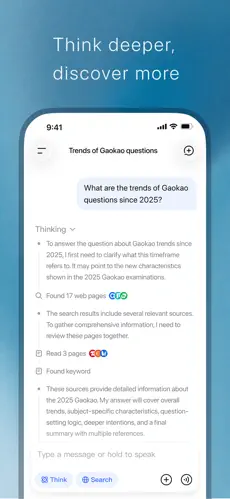
Advanced reasoning: DeepSeek models support a thinking/reasoning mode intended for more complicated problems. The latest API models offer multiple thinking-effort levels for different levels of task complexity.
Web search: DeepSeek’s app includes web-search functionality, allowing the assistant to use information from the internet when appropriate.
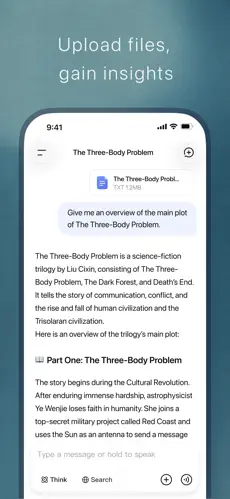
File support: Users can upload files for text extraction and analysis. Recent mobile updates have also improved file uploading.
Image/vision understanding: The current DeepSeek-V4.1-Flash model provides native multimodal visual understanding, allowing DeepSeek to work with visual input as well as text.
Programming assistance: DeepSeek can generate, explain, debug, and analyze code. Its developer platform also supports tool calls, JSON output and APIs for integrating DeepSeek into software.
Chat-history features: The mobile app supports chat-history searching, while DeepSeek has also documented cross-platform chat-history synchronization.
4. Uses
DeepSeek can be used for many everyday, educational, creative, and professional tasks. Common examples include answering questions, explaining difficult concepts, summarizing documents, translating or rewriting text, brainstorming, drafting articles and emails, solving math and logic problems, generating and debugging code, analyzing uploaded material, understanding images, and conducting web-assisted research.
Users should still verify important information independently. Like other generative AI systems, DeepSeek can produce incorrect or incomplete answers even when the response sounds convincing.
5. Who Can Use It
Students can use DeepSeek to understand difficult subjects, summarize study material, generate practice questions, work through mathematics, and get explanations of programming concepts. It should be used as a learning assistant rather than as a substitute for doing required academic work.
Content creators can use it for brainstorming, outlines, scripts, captions, article drafts, rewriting, and idea development.
Freelancers may find it useful for research, drafting client material, analyzing documents, coding, and routine writing tasks.
Businesses and professionals can use it to summarize information, prepare drafts, analyze text, brainstorm strategies, assist with coding, and automate AI-powered workflows through the DeepSeek API.
General users can use it for everyday questions, explanations, writing assistance, planning, translation, and problem solving.
6. How to Use DeepSeek
Getting started is straightforward:
- Visit the official DeepSeek website or install the official DeepSeek – AI Assistant mobile app.
- Create/sign into an account where required.
- Open a new chat.
- Type your question or instruction.
- Upload a supported file or image when you want DeepSeek to analyze something rather than just answer a text question.
- Continue asking follow-up questions to refine the response.
DeepSeek has documented support for login using options including email, Google Account, and Apple ID.
Open the official DeepSeek website
7. Free & Paid Plans
DeepSeek app
The official DeepSeek – AI Assistant is currently listed as free on both Google Play and Apple’s App Store. DeepSeek originally announced its consumer app as free, with no ads or in-app purchases. The current App Store listing also shows the app simply as “Free.”
I could not verify a current conventional consumer subscription plan such as a monthly “DeepSeek Plus” or “DeepSeek Pro” subscription from DeepSeek’s official sources, so it would be misleading to claim that one exists.
DeepSeek API
The API is different from the free consumer app. Developers and businesses can pay according to the number of tokens processed.
As of September 2026, DeepSeek’s official API pricing lists DeepSeek-V4.1-Flash (deepseek-flash) and DeepSeek-V4-Pro, with separate input/output rates and lower off-peak pricing. These prices can change, so developers should check the current pricing page rather than relying on old figures.
8. Pros & Cons
Advantages
Free consumer access: The official mobile app is currently offered free of charge.
Strong reasoning capabilities: DeepSeek provides thinking/reasoning functionality for difficult tasks.
Useful for coding and mathematics: Its models are designed to handle technical problem solving as well as general conversation.
Web, files and images: It goes beyond basic text chat through web search, file uploads and visual understanding.
Developer API: Programmers and businesses can integrate DeepSeek models into their own applications. The current API supports features such as tool calls and JSON output.
Limitations
Answers can be wrong: AI-generated information should not automatically be treated as factual, especially for medical, legal, financial, academic, or other important decisions.
Internet information still needs verification: Having web-search functionality does not guarantee that every answer will be current or accurate.
Privacy should be considered: Users should be careful about uploading confidential or highly sensitive information. Apple’s current privacy disclosure says data linked to users may include contact information, user content, search history, identifiers, usage data, diagnostics, and coarse location, depending on use. Apple notes that these disclosures are supplied by the developer and are not independently verified by Apple.
Some usage restrictions may apply: Free access does not necessarily mean unlimited access to every feature at all times; service capacity and usage limits can change.
9. Platforms
DeepSeek is officially available on:
Web: DeepSeek provides a browser-based chat service through its website.
Android: The official DeepSeek – AI Assistant is available through Google Play and has more than 50 million downloads according to its current listing.
iPhone and iPad: The official app is available through Apple’s App Store and currently requires iOS/iPadOS 15.0 or later.
I could not verify dedicated official Windows or macOS desktop applications from DeepSeek’s current official product information, so I would not list them as confirmed native desktop apps. Desktop users can use the web version.
10. Final Summary
DeepSeek – AI Assistant is particularly useful for students, programmers, researchers, writers, professionals, and general users who want a free AI assistant for questions, reasoning, writing, coding, file analysis, web-assisted research, and visual understanding. Its free consumer access and broad capabilities make it worth trying, but important information and AI-generated answers should still be independently checked.