





About this app
Grok is an artificial-intelligence assistant developed by xAI. It is designed as a general-purpose AI assistant for chatting, searching for information, reasoning through problems, writing, coding, analyzing uploaded files, and creating images and videos. The current official documentation identifies Grok 4.6 as the latest Grok model.
Grok is available as a standalone service and is also integrated with X.
2. Purpose
Grok is designed to help users find information, understand topics, solve problems, and create content through natural-language conversations.
Users can ask normal questions or give Grok more complex tasks involving research, reasoning, writing, coding, files, images, and other forms of content. It can also search current information from the web and X, making it useful for questions where recent information matters.
3. Main Features
Some of Grok’s most important current features include:
- AI chat: Ask questions, brainstorm ideas, write content, summarize information, and work through problems conversationally.
- Web and X search: Grok can search current information from the web and X. Free access is limited compared with higher plans.
- Reasoning: Grok offers reasoning capabilities for more complicated questions and problems.
- File analysis: Users can upload PDFs, images, spreadsheets, code, audio, and other supported files for summarization, extraction, analysis, and related tasks.
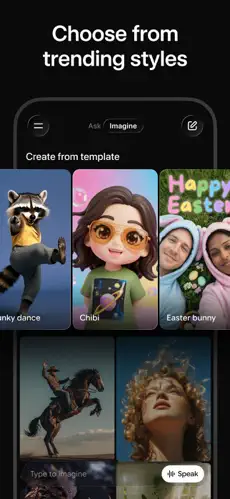
- Image generation: Grok Imagine can generate images from text instructions.
- Video generation: Grok also supports AI video generation.
- Voice: Users can have spoken conversations with Grok.
- Coding: Grok can generate and work with code.
- Grok Build: Users can describe an app, website, game, or dashboard and have Grok create a working version. As of August 2026, Grok Build is available on every plan.
- Connectors: Grok can connect to supported tools so users can work with information such as files, email, and calendars from a conversation.
- Synced conversations: Chats, settings, and subscriptions can sync across supported devices when signed into the same account.
4. Uses
Grok can be used for many everyday, educational, creative, and professional tasks. For example, users can ask it to explain difficult concepts, summarize documents, brainstorm ideas, draft articles or emails, create social-media content, translate or rewrite text, research topics, analyze spreadsheets and PDFs, generate or explain code, troubleshoot programming problems, create images and videos, plan trips, and build simple apps or websites.
Its ability to combine conversation with web/X search can also be useful when researching recent topics. However, users should still verify important factual, academic, financial, medical, legal, or professional information rather than assuming every AI-generated answer is correct.
5. Who Can Use It?
Students can use Grok to understand subjects, summarize study material, brainstorm ideas, practice questions, and get explanations. It should be used as a learning aid rather than as a substitute for doing required coursework.
Content creators can use it for brainstorming, outlines, scripts, captions, rewriting, research, and generating images or videos.
Freelancers can use it to draft communications, research projects, analyze files, brainstorm solutions, and assist with coding and other client work.
Businesses and professionals can use Grok for research, document analysis, writing, coding, data-related tasks, and workflows involving supported connectors. xAI also offers separate Business and Enterprise plans with organizational controls.
General users can use Grok for everyday questions, explanations, planning, recommendations, brainstorming, creative projects, and current-information searches.
6. How to Use Grok
Getting started is straightforward. Visit Grok’s official website or install the official iOS or Android app. Sign in using an available account option, such as an X or email account, and then enter a question or instruction in the chat box.
You can continue the conversation with follow-up questions and, when appropriate, switch to features involving search, reasoning, voice, images, or other capabilities. Files can be added using the + button beside the message input; drag-and-drop is also supported on the web.
7. Free & Paid Plans
Yes, Grok has a free option. xAI describes Grok as “free to start,” although usage and some advanced capabilities are limited compared with paid plans.
As of September 2026, xAI’s official pricing page lists Free, SuperGrok Lite, SuperGrok, SuperGrok Plus, SuperGrok Heavy, Business, and Enterprise options. Higher paid tiers generally provide greater usage allowances and access to more advanced capabilities. Exact limits and features depend on the tier.
Grok can also be accessed through X subscriptions. X states that its Premium tier provides increased Grok usage limits, while Premium+ includes SuperGrok access and additional Grok capabilities.
Because pricing, usage allowances, taxes, and available plans can differ by location and can change, the safest place to check the current cost is xAI’s official Grok pricing page.
8. Pros & Cons
Advantages: Grok combines several AI tools in one service, including chat, reasoning, current web/X search, file analysis, coding, voice interaction, and image/video generation. Its access to current web and X information can be particularly useful for researching recent events, while Grok Build adds the ability to create functioning apps, websites, games, and dashboards from natural-language instructions.
Limitations: Like other generative AI systems, Grok can produce inaccurate, incomplete, or misleading answers, so important information should be checked against reliable sources. The free plan has usage and feature limitations, while greater usage and some advanced capabilities require paid subscriptions. Availability can also vary by platform, plan, and location; for example, xAI notes that some features are platform-specific.
9. Platforms
The main Grok assistant is officially available on:
- Web — through grok.com
- iOS — official iPhone/iOS app
- Android — official Android app
- X — Grok functionality is also available through the X platform.
xAI’s current documentation describes the standalone Grok assistant specifically as available on the web, iOS, and Android. Therefore, I would not describe the regular Grok app as having verified standalone Windows and macOS versions based on that documentation. xAI does offer a separate Grok Bot product with Windows, macOS, and Linux applications, but that is distinct from the regular Grok chat app.
10. Final Summary
Grok is especially useful for people who want one AI assistant for research, current-information searches, writing, reasoning, coding, file analysis, and AI-generated media. The free version makes it easy to try, while users who need higher limits or more advanced capabilities can consider one of the SuperGrok plans.