




About this app
Kimi is an artificial intelligence assistant developed by Moonshot AI. It combines conversational AI with web search, reasoning, multimodal understanding, document processing, research, coding, content creation, and autonomous AI-agent capabilities.
Kimi has developed beyond a basic chatbot into a broader AI workspace. Its newer models and agent tools can handle complex, multi-step tasks such as researching a topic, analyzing documents, creating presentations and spreadsheets, building websites, working with code, and automating certain workflows.
2. Purpose
Kimi is designed to help users find information, understand difficult topics, create content, analyze files, solve problems, perform research, write and modify code, and complete work that would normally require several separate tools.
For simple tasks, it works like a conversational AI assistant: users enter a question or instruction and receive a response. For more complicated work, Kimi’s Agent capabilities can plan a task, use available tools, perform multiple steps, and produce a finished result.
3. Main Features
AI Chat and Reasoning
Kimi can answer questions, explain concepts, brainstorm ideas, write and edit text, summarize information, and work through reasoning-based problems. Users can choose between different Kimi models depending on the task.
Its current model lineup includes K2.6 for faster conversations and Q&A, K3 for more advanced conversations and agent tasks, and K3 Swarm for large-scale research and batch processing.
Web-Connected Search
Kimi can search the web when a question requires current or external information. It can combine information found online with its AI reasoning, making it useful for research and information gathering.
Deep Research
Kimi can perform more extensive research tasks instead of giving only a quick chatbot response. This is useful when users need information gathered, analyzed, organized, and turned into a structured result.
Kimi Agent
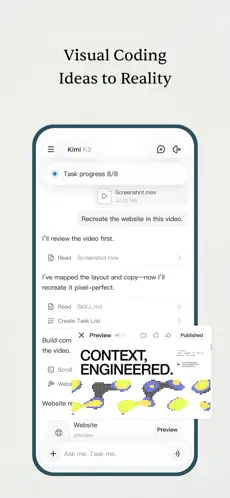
Kimi Agent can autonomously plan and perform multi-step tasks. Depending on the task and available tools, it can conduct research, process files, create documents and presentations, work with spreadsheets, generate websites, and perform other complex workflows.
Agent Swarm
For particularly large jobs, Kimi provides Agent Swarm, which divides work among multiple AI sub-agents. The system is designed for tasks such as large-scale research, batch processing, extensive writing, and other workloads that benefit from parallel execution.
Long-Context Processing
Kimi is particularly focused on handling large amounts of information. The K3 model supports a context window of up to one million tokens, making it suitable for very long documents, extensive conversations, large research collections, and complex knowledge-work tasks.
File Analysis
Users can upload and work with formats including:
- Word documents
- Excel spreadsheets
- PowerPoint presentations
- Images
- TXT files
- Video files
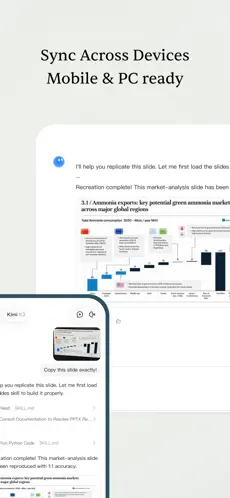
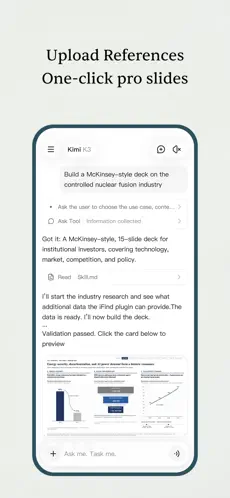
Kimi can read, summarize, explain, analyze, transform, and in supported workflows create or modify office-style content. Individual uploaded files can be up to 100 MB, and Kimi supports up to 50 files in applicable file workflows.
Documents, Spreadsheets and Presentations
Kimi can assist with Word-style documents, spreadsheet analysis and financial modeling, presentation generation, document formatting, editing, reviewing, and visual content creation.
Coding
Kimi can generate, explain, debug, and modify code. Developers can also use Kimi Code, which works with codebases through terminals and supported development environments.
Multimodal Understanding
Kimi can work with more than plain text. Its capabilities include understanding images and other supported file types, while its featured tools include photo-based problem solving and voice-related functions.
Kimi Work
Kimi Work is Kimi’s desktop-oriented AI agent for knowledge workers. It can work with selected local folders and files, use browser-agent capabilities, perform research and analysis, and handle more complex computer-based workflows.
Projects and Memory
Kimi supports Projects for keeping related conversations, instructions, and files together. It also provides memory-related functionality that can help retain useful preferences and context for future conversations where the feature is available.
4. Uses
Users can use Kimi for many different tasks, including:
- Asking general or detailed questions
- Researching topics using online information
- Summarizing long articles and documents
- Studying and understanding difficult concepts
- Analyzing PDFs and other uploaded files
- Writing articles, reports, outlines, emails, and other content
- Editing, rewriting, translating, and improving text
- Brainstorming ideas
- Creating presentations
- Creating and analyzing spreadsheets
- Performing data analysis
- Generating and reviewing documents
- Creating websites
- Solving problems from photographs
- Writing, understanding, debugging, and modifying code
- Exploring large codebases
- Conducting deep research
- Processing large collections of information
- Performing repetitive or multi-step tasks with AI agents
- Working with selected local computer files through Kimi Work
The exact features and usage limits depend on the user’s account, subscription level, product version, and platform.
5. Who Can Use It
Students
Students can use Kimi to explain difficult subjects, summarize study material, analyze documents, organize research, create study notes, brainstorm assignments, and understand complex information.
AI-generated academic work should still be checked carefully, and students should follow their school or university’s rules regarding AI use.
Content Creators
Writers, bloggers, social-media creators, marketers, and other creators can use Kimi for brainstorming, research, outlines, rewriting, scripts, content planning, and longer-form writing.
Freelancers
Freelancers can use it for client research, proposals, document preparation, presentations, data analysis, coding, content development, and other productivity tasks.
Businesses
Businesses can use Kimi for research, document processing, presentations, spreadsheet work, website creation, analysis, and AI-assisted knowledge work.
Organizations should still review their own privacy and security requirements before uploading confidential company information to any external AI service.
Developers
Developers can use Kimi for code generation, debugging, code explanation, software-related research, and working with larger codebases. Kimi Code provides additional developer-focused functionality in terminals and supported IDE workflows.
Professionals
Researchers, analysts, consultants, office workers, and other professionals can benefit from Kimi’s document, spreadsheet, presentation, research, and automation capabilities.
General Users
General users can use Kimi for everyday questions, learning, writing, translation, research, idea generation, planning, and general problem solving.
6. How to Use
Getting started with Kimi is straightforward:
- Open Kimi through its web version or install the official mobile or desktop application.
- Create or sign in to a Kimi account if required.
- Open a new conversation.
- Type a question or describe the task you want completed.
- Upload documents, images, spreadsheets, presentations, or other supported files when needed.
- Select an available model if you want a particular level of speed or capability.
- For more complicated work, use Kimi’s Agent or other specialized tools when available.
- Review important AI-generated information before relying on it for academic, financial, professional, legal, medical, or other high-impact decisions.
Kimi can automatically determine when online search is useful for a question, so users do not always need to enable search manually.
7. Free & Paid Plans
Free Access
Yes. Kimi provides free access, although free accounts have usage limits and smaller allocations than paid memberships. Official Kimi documentation confirms that free users receive an allowance for supported tasks, including Agent-based features.
Exact free limits can change, so users should check the current limits shown inside their account.
Paid Memberships
As of October 2026, Kimi lists four main paid membership levels:
- Andante – ¥49 per month
- Moderato – ¥99 per month
- Allegretto – ¥199 per month
- Allegro – ¥699 per month
Annual subscriptions are also offered with discounted pricing.
Higher plans provide progressively larger usage allowances and additional capabilities. Depending on the membership level, benefits can include:
- More Agent credits
- Faster priority Agent processing
- More simultaneous Agent tasks
- Deep Research
- Office-file processing
- Kimi Code access
- More Projects and storage
- Scheduled tasks
- Plugins
- Agent Swarm
- Higher Agent Swarm parallel-processing limits
- Advanced memory-related features
- Goal Mode
- Kimi Claw access on eligible tiers
- More professional database usage
- Million-token K3 conversations on the highest listed plan
Kimi uses a shared credit system for many premium features, so usage of Agent functions, research, presentations, coding, Kimi Work, Kimi Claw, and related services can draw from the same membership credit pool.
Prices, plan names, regional availability, payment methods, and benefits can change over time.
8. Pros & Cons
Pros
Powerful research capabilities:
Kimi combines AI reasoning with web-connected research and Deep Research tools.
Handles large amounts of information:
Its long-context capabilities are useful for lengthy documents, research collections, and complex conversations.
Strong document support:
It can work with PDFs, documents, spreadsheets, presentations, images, text files, and other supported formats.
Advanced AI agents:
Kimi can perform multi-step tasks instead of requiring users to manually request every individual step.
Agent Swarm:
Large tasks can be divided among multiple sub-agents for parallel processing.
Useful office features:
Kimi can assist with documents, spreadsheets, presentations, research, and other professional workflows.
Good coding capabilities:
Its coding tools can help both casual programmers and developers working with larger projects.
Multiple platforms:
Users can move between web, mobile, and desktop versions, while chat conversations can sync across supported devices.
Cons
Usage limits apply:
Free users have limited allowances, and paid memberships also operate with credit and usage limits.
Advanced features may require payment:
Heavy use of Agent functions, Kimi Code, Agent Swarm, Kimi Claw, long-context workloads, and other premium tools may require an appropriate paid plan.
Credit system can be complicated:
Many advanced features draw from a shared credit pool, so intensive use of one feature can reduce the credits available for others.
AI can still make mistakes:
Like other generative AI systems, Kimi can produce incorrect, incomplete, or misleading information. Important results should be independently checked.
Some capabilities differ by device and plan:
Not every Kimi feature is identical across web, mobile, Windows, macOS, and different membership levels.
Regional differences may exist:
Subscriptions, payment methods, features, and availability can vary depending on the user’s location and account.
9. Platforms
Kimi is officially available across several platforms.
Web
Kimi can be used directly through a web browser.
Android
An official Kimi mobile application is available for Android.
iOS
An official Kimi mobile application is available for iPhone and other supported iOS devices.
HarmonyOS
Kimi also provides a mobile version for HarmonyOS.
Windows
Kimi provides an official Windows desktop application with Kimi Work functionality.
macOS
Kimi is available for both Apple-silicon and Intel-based Macs. However, Kimi Work is supported on Apple-silicon Macs, while the Intel Mac desktop version supports Kimi Chat rather than the full Kimi Work experience.
Developer Environments
Kimi Code can also be used through terminals and supported development environments, including integrations for tools such as VS Code and other compatible IDE workflows.
10. Final Summary
Kimi is best suited to users who want more than a basic AI chatbot, particularly researchers, students, developers, content creators, freelancers, and professionals who regularly work with large documents, research, coding, presentations, spreadsheets, or complex multi-step tasks. Its combination of long-context AI, web research, file processing, Kimi Agent, Agent Swarm, and desktop productivity tools makes it especially useful for demanding knowledge-work and research workflows.