

About this app
Orbi – AI Chatbot & Assistant is an all-in-one AI productivity app developed by AppLab Kamil Piekarz. It combines access to several AI model families—including GPT, Claude, and Gemini—inside one interface, alongside tools for writing, images, documents, mathematics, and programming. The current official listings specifically advertise GPT-5, Claude 4.5, and Gemini 2.5 Pro.
The app was updated on Google Play on July 2, 2026, making the information below based on its recent official listing.
2. Purpose
Orbi is designed to provide multiple AI capabilities in one mobile app instead of requiring users to switch between separate AI services. Users can ask questions, generate written content, create or edit images, summarize documents and websites, solve math problems, and get programming assistance.
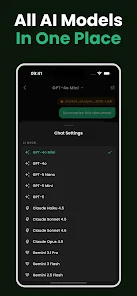
A particularly important part of Orbi’s approach is the ability to switch between different AI models and compare their responses.
3. Main Features
According to Orbi’s official website and current store listings, its main capabilities include:
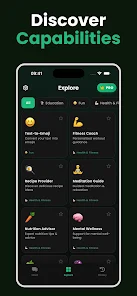
- Multiple AI models: Access to GPT-5, Claude 4.5, and Gemini 2.5 Pro, with the ability to switch models.
- AI Chat: Ask questions, brainstorm ideas, request explanations, and maintain chat history.
- AI Characters: Different AI personalities for educational, professional, and creative purposes.
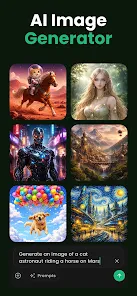
- Image Generation: Generate artwork, illustrations, social-media graphics, and other visuals from text prompts.
- AI Image Editing: Edit and enhance existing images using AI tools.
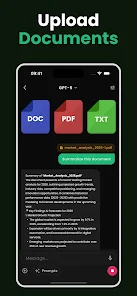
- Document Summarization: Analyze and summarize PDFs, Word documents, and websites.
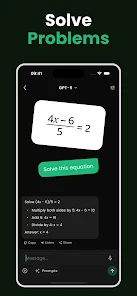
- Math Solver: Work through algebra, calculus, geometry, statistics, and other problems with step-by-step explanations.
- Programming Assistant: Generate, debug, explain, and document code across programming languages.
- Writing Assistant: Produce emails, essays, articles, stories, poems, and professional content.
- Multiple Languages: The current version advertises support for 12 languages.
4. Uses
Orbi can be used for everyday questions and research-style assistance, brainstorming, studying, homework support, summarizing long material, drafting and rewriting text, generating images, creating social-media material, solving mathematics, and programming.
For example, a user could upload a long PDF and ask for its key points, request a step-by-step explanation of a math problem, generate code and ask Orbi to debug it, or create an illustration from a written prompt.
As with other generative-AI tools, important factual, academic, mathematical, or programming outputs should still be checked rather than assumed to be correct.
5. Who Can Use It?
Students can use Orbi for explanations, homework assistance, math problems, essay drafting, and summarizing study materials. Content creators and writers can use its writing and image-generation tools for brainstorming, articles, captions, stories, and visuals.
Freelancers and professionals can use it for drafting emails, analyzing documents, generating content, brainstorming, and other routine knowledge-work tasks. Developers can use the coding assistant to generate, debug, explain, and document code. General users can simply use Orbi as an everyday AI chatbot for questions, ideas, writing, and creative projects.
6. How to Use Orbi
Getting started is straightforward. Install Orbi from the Apple App Store or Google Play, open the application, and use its chat interface to enter a question or instruction. Depending on the task, users can select an available AI model or use specialized capabilities such as document analysis, image generation/editing, math solving, or coding.
Certain functionality may require an account, according to Orbi’s terms of service.
7. Free & Paid Plans
Yes, Orbi has a free tier. Both major app stores list it as free to download with in-app purchases, while Orbi’s terms explicitly state that the service has free and premium (Orbi Pro) tiers.
Orbi says its premium subscriptions provide access to advanced AI models and additional features, but its public terms do not provide a sufficiently detailed current feature-by-feature comparison between Free and Pro. Therefore, exact usage limits and which individual tools require Pro should be checked inside the app before subscribing.
Prices also vary by platform, country, and offer. For reference, the U.S. App Store currently lists Orbi Pro options including $9.99/week and $69.99/year, alongside some older/other “Chatbot Pro” purchases. These prices can change, so the price displayed inside Orbi for your account is the relevant one.
8. Pros & Cons
Advantages: Orbi puts several major AI model families into one interface, reducing the need to switch apps. It also has an unusually broad toolset covering text chat, writing, images, PDFs/documents, websites, math, and programming. Being able to switch models can also be useful when users want different approaches to the same question.
Limitations: Some capabilities are behind a premium subscription, and the exact free-versus-Pro limits are not clearly documented on the public website. AI-generated answers can also be inaccurate and should be verified for important work. Users handling confidential information should review Orbi’s privacy policy before uploading it: the policy says submitted content can include conversations, documents, PDFs, code, math problems, and image prompts, and that conversation data may be stored on its servers for features such as history synchronization.
9. Platforms
Orbi is officially available for Android through Google Play and iPhone/iPad through Apple’s App Store.
Apple’s listing additionally says the iOS app is compatible with Macs using Apple silicon (M1 or later) running macOS 11 or later, as well as Apple Vision.
I could not verify a dedicated Windows application or a full browser-based Web version of Orbi. Its official website currently directs users toward the iOS and Android apps rather than providing the AI chatbot itself as a web app.
10. Final Summary
Orbi – AI Chatbot & Assistant is best suited to users who want several AI models and tools inside a single mobile application. Its combination of AI chat, writing, image creation/editing, document summarization, math assistance, and coding makes it particularly useful for students, creators, developers, freelancers, and professionals who regularly perform different kinds of AI-assisted tasks.