
XLOOKUP vs VLOOKUP: Key Differences, Examples, and Which One Is Better?
Finding one piece of information in a spreadsheet shouldn’t feel like searching for a needle in a digital haystack. Yet […]
Read article →Creating a virtual influencer sounds like a lot of work. You need a recognizable face, pictures for social media, and […]
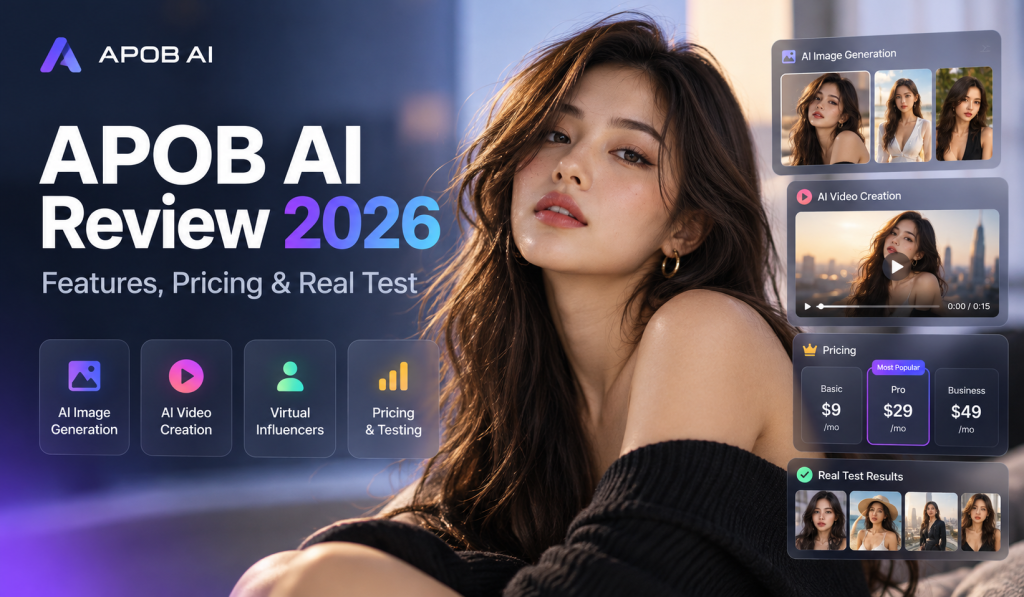
Creating a virtual influencer sounds like a lot of work. You need a recognizable face, pictures for social media, and videos that look natural enough for people to watch.
APOB AI tries to handle much of that work in one place.
You can create a fictional character, change its clothes, place it in different settings, and turn still pictures into videos. The platform also has face-swapping tools and talking avatars with lip-sync capabilities.
But there's a catch with AI-generated people. A character might look convincing in one picture and completely different in the next. Hands can look strange. Facial expressions sometimes feel stiff.
So how much control does APOB AI give you, and is the free plan useful enough to try?
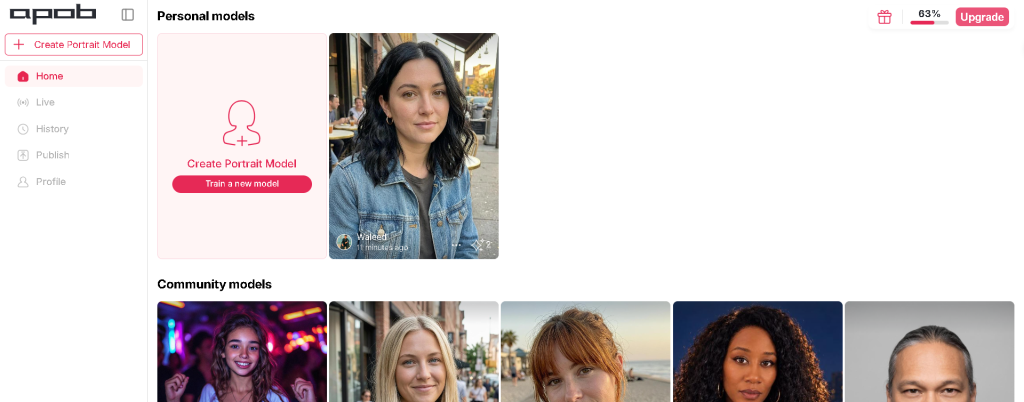
APOB AI is an online tool for creating AI-generated characters, portraits, and videos. It's aimed at content creators, marketers, and people who want to build virtual personalities for social media.
The platform lets you start with your own photograph or design a fictional face using its AI influencer generator. After creating a character model, you can reuse that character for new pictures and videos.
That's useful if you're building an Instagram account around a virtual fashion model, for example. You can produce images of the same character wearing different outfits or visiting different locations.
APOB AI also includes tools for image editing, video creation, and face swapping. These features are listed on its official website.
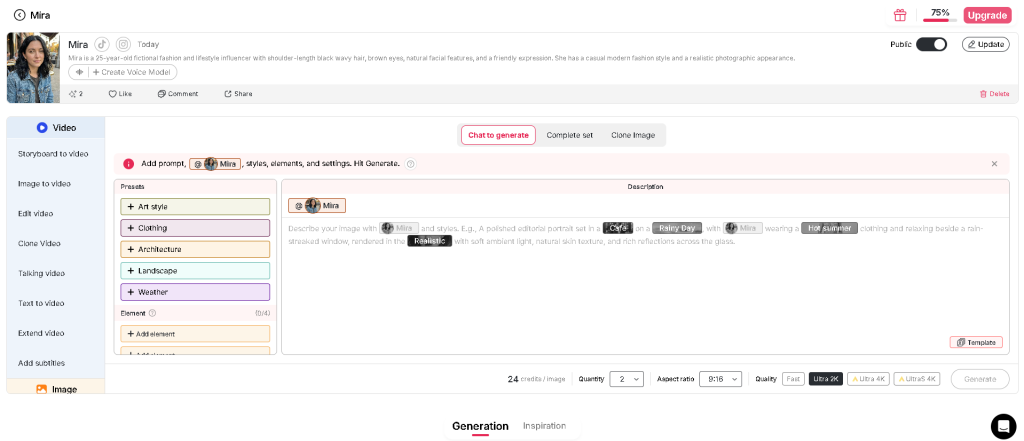
APOB AI starts with a reusable character model. In testing, the platform allowed us to save a portrait model named “Mira,” attach a written description, and then use that same model across different generation workflows. The interface connects character setup with both image and video creation, which makes the workflow easier to follow than tools that separate those steps completely.
You can upload a clear picture of yourself or someone who has given you permission to use their likeness.
APOB AI uses the image to create a character model. You can then generate new scenes featuring that character.
You can design a character without uploading a real person's photograph.
The AI influencer generator allows you to describe appearance details such as age, hairstyle, eye color, and other visual characteristics.
Once the character is ready, you can use it for image and video generation. APOB's help center explains that a portrait model starts with a single reference image.
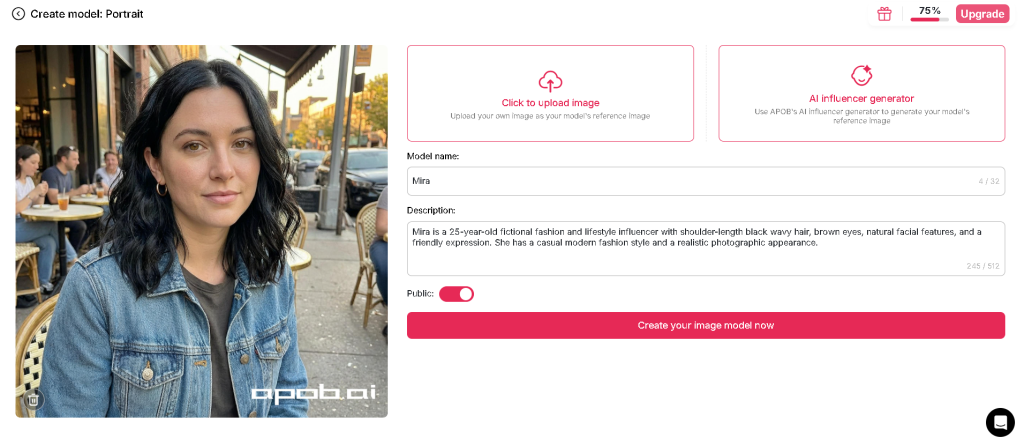
The AI influencer generator is one of APOB AI’s core tools. During setup, the platform gives users 2 starting points: upload a reference image or use the built-in AI influencer generator to create a fictional character. The same setup screen also includes fields for model naming, description, and visibility settings, which makes the character creation process feel structured from the start.
In our test, APOB AI generated images by combining a saved character model with a written prompt.
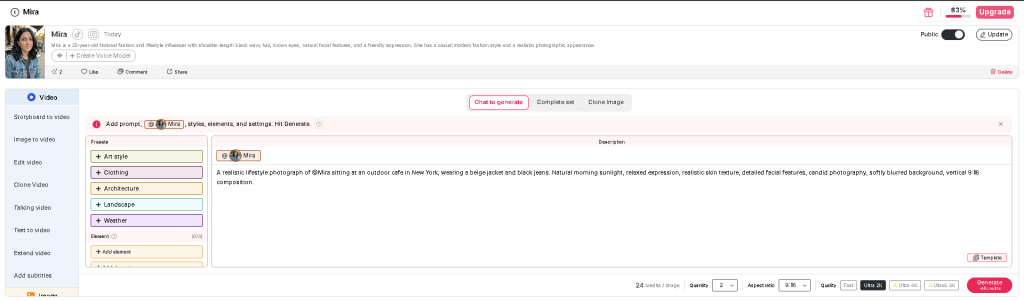
APOB AI generates images from text prompts, but the process is more structured than a blank prompt box. In our test, we selected the saved “Mira” model and used a lifestyle prompt describing an outdoor cafe setting, beige jacket, black jeans, natural morning light, and a vertical 9:16 composition.
The workspace also included preset controls for art style, clothing, architecture, landscape, weather, and extra elements. Settings for quantity, aspect ratio, quality, and credit cost were visible at the bottom of the screen. In this test view, APOB AI showed a cost of 24 credits per image and supported quality modes such as Fast, Ultra 2K, Ultra 4K, and UltraS 4K.
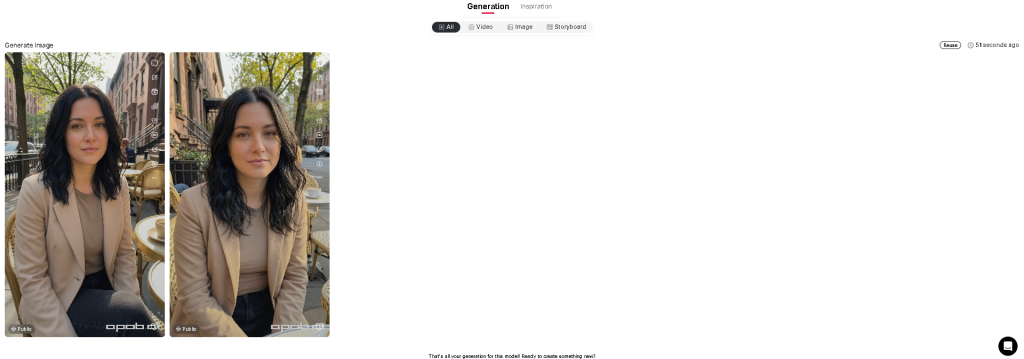
The generated outputs stayed fairly close to the reference character. Mira’s black wavy hair, soft facial features, and casual lifestyle look carried into the final images, while the cafe environment and outfit details also matched the prompt reasonably well. Based on this test, APOB AI appears well suited for creators who want social-media-style portrait content built around a reusable fictional character.
Prompt used in this test:
A realistic lifestyle photograph of @Mira sitting at an outdoor cafe in New York, wearing a beige jacket and black jeans. Natural morning sunlight, relaxed expression, realistic skin texture, detailed facial features, candid photography, softly blurred background, vertical 9:16 composition.
And small details matter. Clothing colors, camera angles, and lighting instructions can change the final picture.
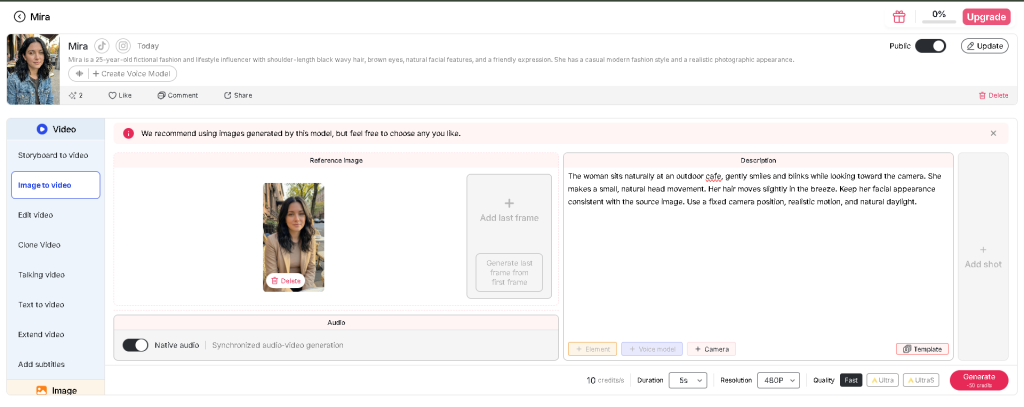
We converted one of Mira's generated portraits into a 5-second video using APOB AI's Image to Video tool. The test used Fast quality at 480P, with a displayed cost of 50 credits.
The finished clip showed Mira blinking and gradually tilting her head toward one side. Her facial features stayed recognizable across the video, and the outdoor cafe background remained visually stable. Hair movement was limited, although the overall motion looked reasonably natural for a short portrait animation.
The result was encouraging for simple social media clips. We'd need to test longer videos and more complicated movements before judging how well APOB AI handles full-body animation or extended scenes.
APOB AI includes a Talking Video tool for creating speaking digital characters. The dashboard also displays a Create Voice Model option for saved portrait models.
We found these options while testing our fictional character, Mira. However, our available credits ran out before we could generate a talking video. We therefore couldn't check the voice quality or how accurately the character's lips follow the spoken dialogue.
For creators planning to produce talking-avatar videos regularly, these are worth testing before purchasing a subscription.
APOB AI includes a face-swapping feature for replacing faces in supported images and videos. It can be useful for experimenting with fictional characters or editing creative content.
During our APOB AI research, we focused on creating the fictional character Mira, generating her portraits, and converting one image into a short video. Our free credits ran out before we could test face swapping.
For that reason, we can't confirm how accurately the tool preserves facial details or handles different camera angles.
If you plan to use this feature, stick to your own photographs, fictional characters, or images you have permission to edit. Face-swapped content can mislead viewers when it makes a real person appear to do or say something they never did.
APOB AI includes photo-editing options for changing outfits, adjusting backgrounds, and modifying character images.
During our test, we created two portraits of Mira wearing a beige jacket at an outdoor cafe. Both images followed the original prompt reasonably well, so we didn't need to make any corrections.
We haven't tested APOB AI's editing tools yet. Our free credits ran out after generating images and a short video, so we can't judge how accurately the editor changes clothing or backgrounds while preserving the character's face.
For creators who regularly edit AI portraits, the main thing to check is whether the character still looks recognizable after several changes.
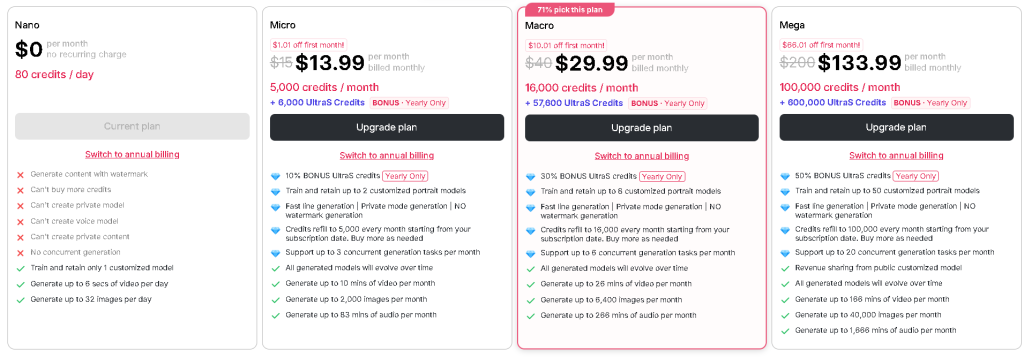
APOB AI has 4 subscription plans, starting with a free Nano account.
When we checked the pricing dashboard in October 2026, the Nano plan included 80 daily credits. The paid plans displayed discounted first-month prices, with regular subscription rates shown beside them..
| Plan | Regular price | Displayed monthly price | Credits |
|---|---|---|---|
| Nano | $0 | $0 | 80/day |
| Micro | $15 | $13.99 | 5,000/month |
| Macro | $40 | $29.99 | 16,000/month |
| Mega | $200 | $133.99 | 100,000/month |
The Micro plan allows up to 2 customized portrait models, while Macro allows 8 and Mega allows 50.
APOB AI also advertises extra UltraS credits with annual subscriptions. These bonuses are separate from the standard monthly credit allowances.
Prices can change, so check the official pricing page before subscribing.
Yes. We tested APOB AI using its free Nano plan, which provides 80 credits per day.
We created a fictional portrait model named Mira, generated two lifestyle images, and converted one portrait into a short video.
During image generation, the interface displayed a cost of 24 credits per image at our selected settings. Our 5-second video test cost 50 credits at 480P using Fast quality.
The generated images also contained APOB AI branding. The free plan limits private model creation and other account features.
Our available credits eventually ran out, leaving us unable to test the talking-avatar and photo-editing features.
The free plan gives you room to experiment, although repeated image and video generation can consume the daily allowance quickly.
Getting started doesn't require programming skills.
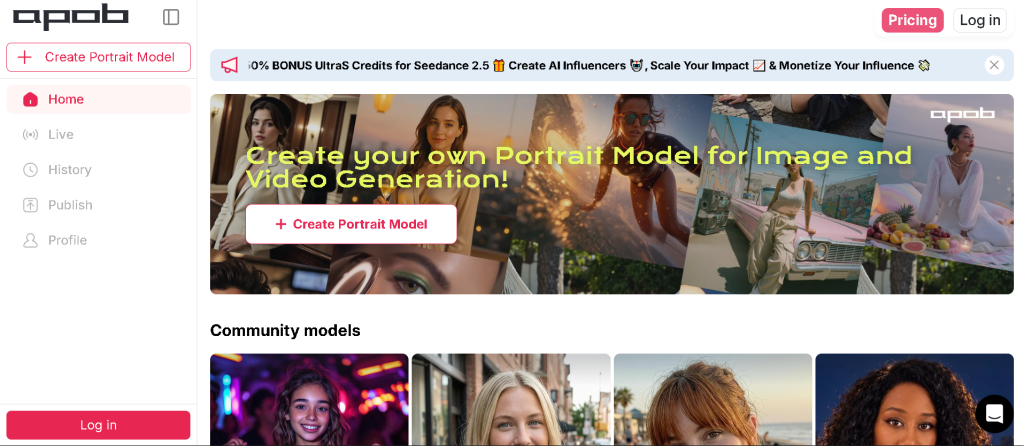
Open APOB AI and create an account. Sign in to access the character creation tools.
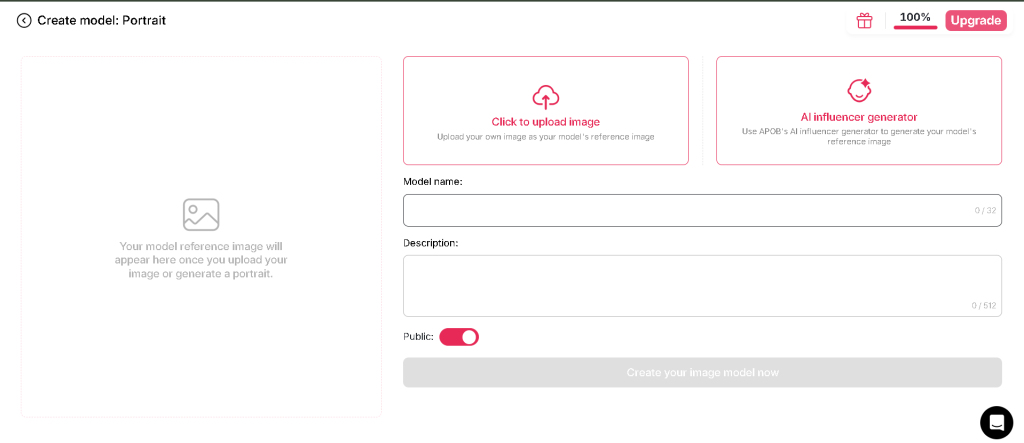
Select the portrait model creation option. Upload an authorized photo or use the AI influencer generator to design a fictional character. Give the model a name.
Choose your character and open the image generator. Write a description of the clothes, background, lighting, and pose you want.
If you want an animated result, open the video tools. Select the source image, add instructions for movement, and choose the available generation settings.
Check the finished image or video for mistakes. Download the file when you're happy with it. Free-plan downloads carry a watermark.
APOB's help center confirms these main creation and download workflows.
The portrait model system was useful. After creating Mira, we could select the same character for image generation without rebuilding her appearance.
Both generated cafe portraits kept her black wavy hair and recognizable facial features. The clothing and outdoor setting also followed our prompt closely.
Video creation worked through a separate Image to Video screen. We selected one of Mira's portraits and generated a short animation with blinking and head movement. The cafe background remained fairly stable throughout the clip.
Credit consumption was our main limitation.
Generating two images and a short video used a substantial portion of our available credits. We couldn't continue testing the talking-avatar and editing tools after exhausting the free allowance.
The video also had limited hair movement. Its simple facial animation looked reasonably natural, although we haven't tested more demanding actions or longer clips.
The free plan's restrictions make it harder to judge every feature before purchasing a subscription.
APOB AI makes the most sense for people who regularly produce visual content.
A fashion creator could test outfit concepts on a fictional model. A small business could create a digital presenter for short advertisements. A YouTube creator could develop a recurring animated host.
It also has potential for social media experiments where someone wants to build an original virtual personality.
I'd be more cautious about relying on generated videos for product demonstrations. If an AI character appears to apply makeup or operate a device, the movement may be inaccurate.
For real product claims, use footage that accurately shows the product.
You can use APOB AI to create content for commercial projects, subject to the platform's terms and your rights to the material.
Possible uses include selling custom creative services, producing authorized marketing images, or developing a social media account around a fictional character.
APOB also documents an affiliate program and revenue sharing for eligible public models on its Mega plan.
Actual income depends on customers, audience interest, content quality, and costs.
Creating a fictional influencer alone won't guarantee followers or revenue. You'll still have to come up with content people want to watch.
APOB AI is accessible through its official website and provides account, billing, and content-management features.
Still, I'd avoid uploading private photographs or client images until you've checked the platform's current privacy terms and understand how your content can be used.
There are a few sensible precautions.
Use photos you own or have permission to edit. Keep personal information out of prompts. Check content visibility settings before publishing. And disclose realistic AI-generated people when required by the platform where you share them.
If your work involves a real person's likeness, permission should come before generation.
Our experience with APOB AI was encouraging for basic virtual influencer content.
We created Mira as a reusable portrait model, generated two cafe photographs, and turned one of those images into a short animation.
The face remained recognizable across the tested images, and the video preserved the general appearance of the original character. The result worked reasonably well for a simple social media portrait clip.
Credits were the biggest restriction. Once our free allowance ran out, we couldn't test talking avatars, face swapping, or photo editing.
I'd recommend trying APOB AI's free plan if you're interested in creating a fictional influencer. The portrait and image-generation tools gave us usable results. A paid subscription deserves more consideration, especially if you need longer videos or plan to generate content every day.
Our testing covered portrait creation, image generation, and a 5-second image-to-video clip using the free plan. Paid subscriptions and several editing features remain untested.
APOB AI lets users create fictional AI influencers, generate portraits, and turn still images into short videos. It also includes tools for talking avatars, face swapping, and photo editing.
During our test, we created a character named Mira and used her portrait model to generate images and a short video.
APOB AI has a free Nano plan with 80 daily credits. We used the free account to create Mira, generate portraits, and test the Image to Video feature.
The free allowance ran out before we could try every tool. Paid subscriptions provide larger credit allowances and additional account features.
Yes. Our two generated images of Mira kept her black wavy hair, facial appearance, and requested cafe setting reasonably consistent.
We also converted one portrait into a 5-second video. Mira remained recognizable throughout the clip, although hair movement was limited.
APOB AI includes video-generation tools that can create short clips for YouTube Shorts and other social platforms.
Our test produced a 5-second vertical video at 480P. Before publishing AI-generated videos, check the platform's usage terms and YouTube's synthetic-content disclosure requirements.
APOB AI lists face-swapping tools for images and videos. We couldn't test this feature because our free credits had run out.
Use your own photographs or images you have permission to edit, particularly when working with real people's faces.
APOB AI can be accessed through a mobile browser. Its help documentation describes mobile navigation for character models and generation tools.
Our hands-on testing took place on a desktop, so we haven't checked the mobile editing experience.
Our generated images displayed APOB AI branding. The platform advertises watermark-free generation with eligible paid subscriptions.
Check the current subscription terms before upgrading, especially if you need images for commercial projects.
The official website is https://apob.ai/. You can access the creation platform at https://app.apob.ai/.
We spent our free credits testing APOB AI with a fictional character named Mira.
The portrait model worked as a reusable character reference. We generated two cafe portraits using the same model, and both kept Mira's facial appearance reasonably consistent. Her clothing and background also followed our written instructions.
The video test was encouraging. We converted one portrait into a 5-second animation at 480P using Fast quality. Mira blinked and gradually tilted her head while the cafe background remained fairly stable.
Credit usage was the biggest limitation. Our available allowance ran out before we could test talking avatars, face swapping, or photo editing.
I'd recommend starting with APOB AI's free plan if you want to experiment with fictional influencers or short portrait animations. The results from our image and video tests were usable, although more complicated movements and longer videos still need testing.
Our verdict: APOB AI is worth trying for AI portraits and simple character animations. We'd want to test its remaining features before recommending a paid subscription.
Testing scope: Portrait model creation, two generated images, and one 5-second image-to-video clip. Paid plans and advanced editing features were not tested.
Finding one piece of information in a spreadsheet shouldn’t feel like searching for a needle in a digital haystack. Yet […]
Read article →
Ever spent 20 minutes searching for an AI conversation that took only two minutes to write? You’re not alone in […]
Read article →
Thinking about changing your hair color but worried you might regret it? We’ve all seen a gorgeous hair shade on […]
Read article →