
XLOOKUP vs VLOOKUP: Key Differences, Examples, and Which One Is Better?
Finding one piece of information in a spreadsheet shouldn’t feel like searching for a needle in a digital haystack. Yet […]
Read article →Discover 15 of the best free AI tools for writing, research, design, coding, audio, video, and productivity, with practical limits and use cases.

Free AI tools can now help with writing, research, image creation, coding, studying, audio, and everyday planning. The difficult part is no longer finding an AI app—it is choosing one that is genuinely useful without paying before you know whether it fits your workflow.
This guide compares 15 strong options with free access in 2026. Free plans usually have message, credit, export, or model limits, and those limits can change. Always confirm the current allowance on the provider’s website before building an important workflow around it.
ChatGPT is the most flexible starting point for brainstorming, explaining concepts, drafting text, summarizing information, and solving everyday problems. OpenAI’s free tier includes core chat plus limited access to tools such as web search, file analysis, image creation, and data work. Separate rate limits apply to some advanced features.
Best for: people who want one assistant that can handle many different tasks. Watch for: usage caps and the need to verify important factual claims.
Gemini can brainstorm, summarize, draft content, work with uploaded material, and connect with supported Google services. Google documents standard access for people without a paid Google AI plan, although model and feature limits vary by region and demand.
Best for: users already working with Google apps. Watch for: account, country, and age-based feature differences.
Claude is particularly useful for rewriting, outlining, analyzing text and images, explaining code, and producing readable long-form drafts. Anthropic lists a $0 Free plan intended for occasional use, with lower capacity than its paid plans.
Best for: writers, students, analysts, and people reviewing lengthy material. Watch for: capacity limits during busy periods.
Perplexity behaves more like an answer engine than a traditional chatbot. It searches the web and presents linked sources, which makes it useful for quick research and discovery. Its free account includes core features with a limited number of Pro searches and file uploads.
Best for: finding an initial answer and the sources behind it. Watch for: citations still need to be opened and checked.
NotebookLM lets you build a research notebook from documents, webpages, and other supported sources. It can produce summaries, answer questions based on those materials, and create study-oriented outputs. Because its responses are grounded in the sources you add, it is useful for courses, reports, and research projects.
Best for: students, researchers, and teams organizing a defined source collection.
Microsoft Copilot provides conversational help for search, writing, planning, and image-related tasks. It is a practical free option for people who prefer Microsoft’s ecosystem and want a web-accessible general assistant.
Best for: everyday questions, drafts, and web-assisted answers.
Canva combines templates, drag-and-drop design, and selected AI features. The free plan is useful for social graphics, presentations, simple videos, and marketing materials, while many advanced assets and higher AI limits require Canva Pro.
Best for: non-designers who need polished visuals quickly. Watch for: premium templates, export options, and AI quotas.
Adobe Firefly supports text-to-image creation and other generative design workflows. Free users generally receive a limited allocation of generative credits, making it suitable for testing ideas before considering a paid Creative Cloud or Firefly plan.
Best for: concept art, image variations, and creative experimentation.
Grammarly helps catch grammar, spelling, and clarity problems across common writing surfaces. Its free version is most useful as an editing layer after you have written a draft, while advanced rewriting and tone features have tighter limits or require a paid plan.
Best for: emails, essays, articles, and workplace writing.
Hugging Face Spaces hosts thousands of community-built demos for language, image, audio, and machine-learning models. Many can be tried without payment, although individual Spaces may be slow, paused, or subject to their own rules.
Best for: developers, students, and curious users comparing open models.
Gamma can turn a prompt or outline into a presentation, document, or simple webpage. Its limited free credits are enough to test the workflow and create a small number of projects.
Best for: first drafts of decks, lesson materials, and visual summaries.
ElevenLabs offers natural-sounding text-to-speech and related audio tools. A limited free allowance can be useful for prototypes, accessibility experiments, or evaluating voices. Commercial rights and usage limits depend on the plan.
Best for: voice prototypes and narrated samples.
CapCut combines a free video editor with automated captions, background tools, templates, and selected AI features. Availability can differ between web, desktop, mobile, and regions.
Best for: short-form videos and social content.
Applio is an open-source voice conversion interface aimed at creators and technical users. It is free to download and modify, but local installation may require suitable hardware and careful respect for consent, identity, and copyright.
Best for: users who want more control than a hosted voice service provides.
PlayPhrase.me helps users search for a phrase and hear it spoken in short movie or television clips. It can support listening practice, pronunciation, and discovering how expressions sound in context.
Best for: language learners and pronunciation practice.
Some are fully open source, while many use a freemium model. Freemium tools provide enough access to evaluate the product but reserve higher limits, premium models, team features, or commercial rights for paid customers. “Free” therefore describes the entry point—not necessarily unlimited use.
ChatGPT, Gemini, and Microsoft Copilot are easy starting points because they handle many general tasks through a simple chat interface.
Perplexity is useful for web research with linked sources, while NotebookLM is better when you want answers grounded in a source collection you provide.
Claude and ChatGPT are strong for drafting and restructuring. Grammarly is useful for polishing grammar and clarity after the draft exists.
It depends on the provider, plan, source material, and local law. Check the current license and commercial-use terms before publishing or selling generated work.
Privacy practices differ. Review data controls and retention terms, and avoid submitting confidential or personally sensitive information unless the service is approved for it.
The best free AI tool is the one that fits a specific task with acceptable limits. Start with a general assistant, add a research tool for source checking, and then choose one specialized app for design, voice, or video. A small, well-tested toolkit is usually more productive than signing up for every new AI service.
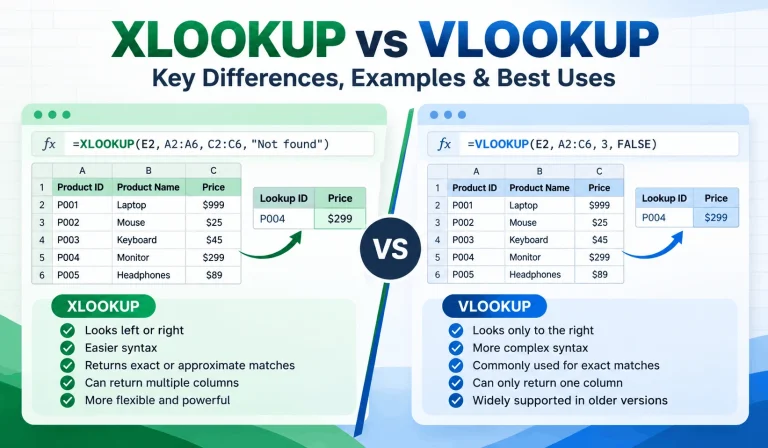
Finding one piece of information in a spreadsheet shouldn’t feel like searching for a needle in a digital haystack. Yet […]
Read article →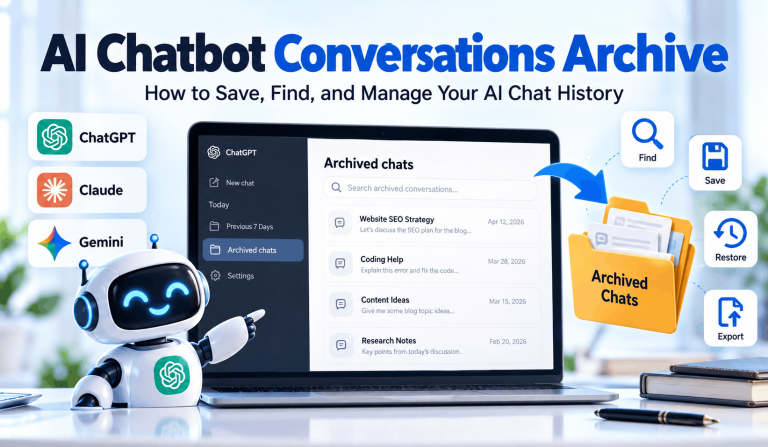
Ever spent 20 minutes searching for an AI conversation that took only two minutes to write? You’re not alone in […]
Read article →
Thinking about changing your hair color but worried you might regret it? We’ve all seen a gorgeous hair shade on […]
Read article →