
AI Chatbot Conversations Archive: How to Save, Find, and Manage Chats
Ever spent 20 minutes searching for an AI conversation that took only two minutes to write? You’re not alone in […]
Read article →What Is DGB LOL? DGB.LOL is an online collection of image-processing tools with a strong focus on AI-assisted image enhancement. […]

DGB.LOL is an online collection of image-processing tools with a strong focus on AI-assisted image enhancement.
According to the official DGB.LOL website, its tools are intended for a broad range of users, including print-on-demand creators, stock-image contributors, KDP creators, and people who simply want to experiment with their images.
The main attraction is the AI Image Upscaler, but the current tool collection includes options such as:
That makes DGB LOL closer to an online image-processing toolbox than a single-purpose upscaling website.
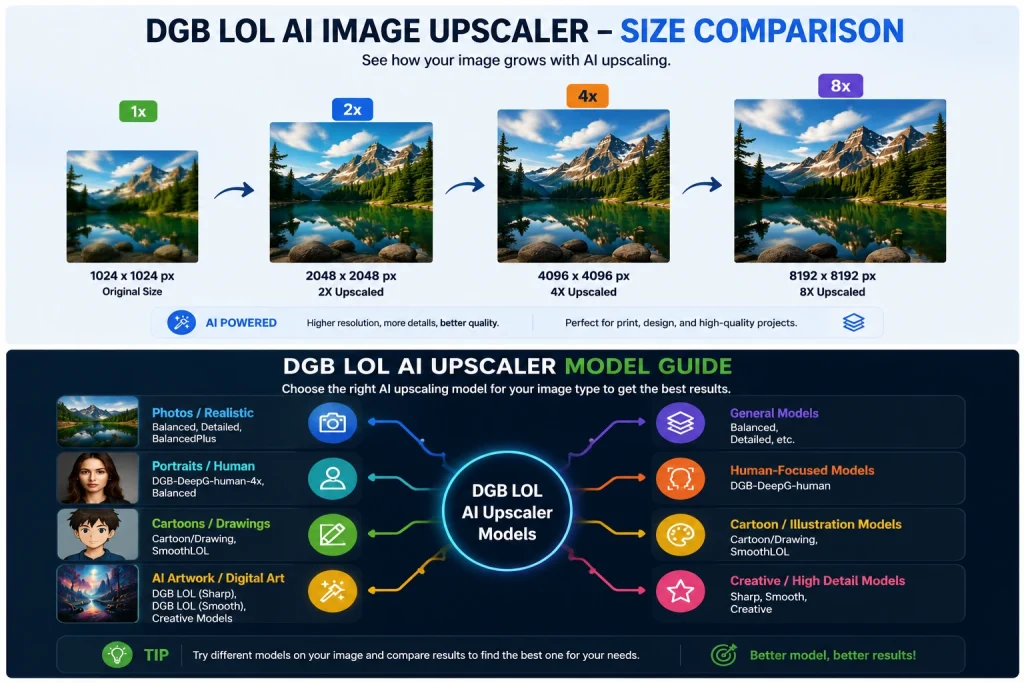
The AI Image Upscaler increases an image's dimensions while applying an AI upscaling model.
At the time of research, DGB.LOL lists upscaling options ranging from 2x to 8x, depending on the selected model.
For example, an image that is 1,000 pixels wide would theoretically become 2,000 pixels wide with 2x enlargement. A higher multiplier produces much larger dimensions, although bigger isn't automatically better.
Upscaling cannot perfectly recover information that was never captured in the original image. AI models instead estimate or reconstruct details based on patterns learned during training.
For that reason, results can vary considerably depending on the source image and model.
One useful feature of DGB LOL is that it doesn't limit users to one generic AI upscaling model.

The current AI Image Upscaler interface lists models including:
The names provide some indication of their intended behavior. A cartoon-oriented model, for example, may be more appropriate for illustrations than a model intended to handle photographic details.
DGB.LOL also provides its own tutorial explaining its upscaler models.
There isn't one model that will always produce the best image.
Start by considering the source:
Photos: Try a balanced or photograph-appropriate model and inspect faces, hair, textures, and edges carefully.
Illustrations and cartoons: A model designed for drawings may preserve stylized lines better.
Images needing strong enlargement: The 6x and 8x options can create much larger files, but examine the result closely for invented details or artifacts.
Human subjects: DGB.LOL currently provides a DGB-DeepG-human-4x option, which may be worth testing against the general models when people are prominent in the source.
The practical approach is to test a representative image before processing an entire collection.
The basic process is straightforward.
Go to DGB.LOL and choose AI Image Upscaler from the available tools.
Upload the image you want to enlarge.
If you're processing multiple compatible files, the main AI Image Upscaler currently supports bulk operation.
The interface currently includes an option to enhance the image's quality before upscaling.
Whether you should use it depends on your source. Enhancement may help some weak images, but stronger processing isn't necessarily desirable when preserving the original appearance is important.
Choose a model based on the type of image and desired enlargement.
Rather than automatically selecting the largest multiplier, think about the final use. A modest enlargement may be enough for many projects.
Submit the image for processing.
DGB.LOL uses a queue system, so the result may not appear immediately.
After submission, you can monitor the task through the site's My Files section.
According to DGB.LOL, completed files are currently stored on its servers for 24 hours after completion, so you should download results you want to keep rather than treating the site as permanent cloud storage.
DGB LOL provides a free tier, but the current service is better described as freemium than as a site where every user receives identical access.
At the time of research, DGB.LOL lists its FREE tier at €0 and says it has unlimited daily operations, subject to queue-related restrictions. Free users may see advertisements and use shared upscaler servers.
Paid membership tiers provide benefits such as larger batch limits, premium upscaling servers or queues, daily credits, and additional queue capacity for certain advanced AI tools.
This distinction matters because older descriptions of DGB LOL found elsewhere on the web may not accurately describe its current access model.
Always check the current DGB.LOL Premium page before making a decision based on pricing or limits, since these details can change.
DGB LOL also offers a Quick Image Upscaler, but it serves a different purpose from the main AI Image Upscaler.
| Feature | AI Image Upscaler | Quick Upscaler |
|---|---|---|
| Main purpose | AI-assisted enlargement | Fast dimension increase |
| Enlargement | Model-dependent, currently up to 8x | 2x, 3x or 4x |
| AI detail enhancement | Yes | No sophisticated AI enhancement |
| Bulk processing | Available | Available |
| Best for | Improving/enlarging images | Simple resizing |
DGB.LOL explicitly describes the Quick Upscaler as using standard, non-sophisticated upscaling techniques.
That means it is useful when you mainly need larger pixel dimensions and don't require AI reconstruction.
For quality-sensitive enlargement, the main AI Image Upscaler is generally the more relevant starting point.
Another option is DGB LOL's Creative AI Image Upscaler.
This tool should not be confused with conventional image enlargement.
According to DGB.LOL, the Creative Upscaler can add details that were not explicitly present in the source image. In other words, it behaves partly like a generative image tool.
That can be useful when you're intentionally trying to make an image richer or more detailed, but it creates an important trade-off:
The result may no longer be a faithful enlargement of the original.
If you're restoring a product image, historical photograph, evidence image, scientific material, or anything where visual accuracy matters, generative enhancement should be treated cautiously.
For artwork or creative projects, the same behavior may be exactly what you want.
AI-generated artwork is an obvious use case for an AI upscaler.
Suppose you've generated an illustration you like, but its dimensions are too small for your intended project. DGB LOL can increase its dimensions before you use it in a larger design.
This can be particularly useful for:
However, inspect the output at full resolution before publishing or printing it.
AI enhancement can alter tiny text, eyes, fingers, patterns, textures, jewelry, architecture, and other complicated details.
DGB.LOL explicitly identifies print-on-demand creators as one of its target audiences.
Upscaling can be useful in a POD workflow when an otherwise suitable image is too small for the intended print dimensions.
But upscaling alone does not guarantee a good print.
Before submitting an image to a print-on-demand platform, check:
DGB LOL also provides tools such as a DPI Enhancer and RGB-to-CMYK converter, but you should follow the requirements of the specific printer or marketplace rather than assuming one setting works everywhere.
The DGB.LOL FAQ currently states that its main AI Image Upscaler produces:
Keep in mind that DPI metadata and actual pixel dimensions are different concepts.
For digital image quality, the available pixels matter. For printing, you need enough pixels for the desired physical print dimensions at an appropriate pixel density.
Simply changing DPI metadata does not magically add image detail.
Yes, several DGB.LOL tools support bulk processing.
The site's main tools page currently marks bulk mode as available for the AI Image Upscaler and several other utilities.
This can be useful if you're working with a collection of AI-generated images or a batch of print assets.
Batch limits can depend on whether you're using free or premium access, so check the current restrictions before preparing a large job.
One of the biggest practical differences between DGB LOL and an instant local image editor is its queue.
AI processing requires computing resources. DGB.LOL therefore queues submitted tasks rather than guaranteeing immediate processing.
Queue lengths and estimated waiting times can change with demand.
For casual jobs, waiting may be perfectly acceptable. For deadline-sensitive professional work, however, a queue introduces uncertainty.
Premium membership provides additional queue-related benefits for some workflows, but users should still check current conditions rather than assume a fixed processing time.
DGB LOL can be useful, but there are several reasons not to treat it as a magic image-quality button.
An upscaler can estimate plausible information, but it cannot know with certainty what was missing from a low-resolution original.
An 8x option sounds attractive, but extreme enlargement may make artifacts easier to notice.
Use the resolution you actually need.
A model that performs well on a digital illustration may not be ideal for a portrait or photograph.
Testing matters.
The queue changes according to server demand and the type of tool being used.
Uploading an image to any online processing service means sending the file to an external system.
Review the service's current privacy policy and terms before uploading confidential, sensitive, private, or commercially restricted material.
Tools such as Creative Upscaler and Re-Imagine can introduce visual information that wasn't present in the original.
Use them for creative transformation rather than factual reconstruction.
A few practical habits can improve your workflow.
If you have several versions of an image, upload the highest-quality original rather than a heavily compressed copy.
If 2x gives you enough pixels, there may be little benefit in jumping immediately to 8x.
A drawing, portrait, AI artwork, and photograph have different visual characteristics.
Choose accordingly.
A thumbnail can hide problems.
Zoom into:
For an important image, process the same source using two suitable models and compare the results.
The model with the largest multiplier isn't necessarily the one that looks best.
DGB LOL is worth considering if you want a browser-based image upscaler without immediately committing to conventional paid image-enhancement software.
Its biggest advantage is the breadth of its toolset. You can move beyond straightforward AI enlargement into background removal, creative enhancement, image conversion, DPI adjustment, vector conversion, and other workflows from the same website.
The trade-off is that free processing can involve queues and usage restrictions, while AI enhancement itself can sometimes modify details rather than faithfully recover them.
For casual image enlargement, AI-generated artwork, print-on-demand preparation, and experimentation, DGB LOL offers a useful collection of tools.
For professional or accuracy-sensitive work, test the output carefully and keep your original files.
DGB LOL has evolved into more than the free upscaler that older tutorials may describe.
Its current AI Image Upscaler supports multiple specialized models and enlargement options reaching 8x, while the broader DGB.LOL platform includes creative enhancement, retouching, background removal, image conversion, vectorization, and other tools.
If your main goal is simply to enlarge an image, start with the standard AI Image Upscaler and choose a model appropriate for the source. Use the Creative Upscaler or Re-Imagine only when you're comfortable with AI adding or interpreting visual details.
Most importantly, judge the finished image rather than the multiplier. The best upscale is the one that gives you enough resolution while keeping the result visually convincing.
DGB LOL, or DGB.LOL, is an online collection of image-processing tools. Its services include an AI Image Upscaler as well as tools for creative enhancement, retouching, background removal, conversion, vectorization, and other image tasks.
DGB.LOL currently has a free €0 tier with unlimited daily operations subject to queue and usage restrictions. Paid memberships provide additional benefits such as higher batch limits and premium queue-related features.
The main DGB LOL AI Image Upscaler currently lists models offering enlargement from 2x up to 8x. Available multipliers depend on the selected model.
Yes. The main DGB LOL AI Image Upscaler currently supports bulk processing. Limits may differ between free and premium users.
It can be useful for enlarging AI-generated illustrations and artwork, particularly when the original output isn't large enough for the intended use. You should still inspect the final image carefully because AI upscaling can alter or invent fine details.

Ever spent 20 minutes searching for an AI conversation that took only two minutes to write? You’re not alone in […]
Read article →
Thinking about changing your hair color but worried you might regret it? We’ve all seen a gorgeous hair shade on […]
Read article →
What beats a rock? If you grew up playing Rock Paper Scissors, your first answer is probably paper. But what […]
Read article →