
XLOOKUP vs VLOOKUP: Key Differences, Examples, and Which One Is Better?
Finding one piece of information in a spreadsheet shouldn’t feel like searching for a needle in a digital haystack. Yet […]
Read article →Compare free AI applications for writing, research, images, coding and productivity, with practical guidance on limits, privacy and safe use.

Free AI applications can now help with writing, research, images, coding, audio, organization and everyday planning. The useful question is not which app has the longest feature list, but which one solves your task accurately, safely and without turning a free trial into an unexpected cost.
This guide explains how to compare free AI apps, where their limits matter and how to build a practical workflow while keeping human judgment in control.
A genuinely free AI application may provide a permanent no-cost tier, while a freemium product reserves higher limits or advanced features for subscribers. A free trial is different: access may expire or require payment details. Always check current limits, export rules and renewal terms on the official pricing page.

Conversational assistants can outline, rewrite and improve clarity. Give the tool your audience, purpose and required format, then edit the draft for accuracy and voice. See our ChatGPT guide and Claude listing.
Research assistants are most useful when they provide direct citations. Open every important source and confirm that it supports the claim. Perplexity and Google Gemini illustrate different research workflows.
Free creative tools commonly impose generation credits, watermarks, resolution limits or restricted commercial rights. Check the licence for every output before publishing or using it for clients.
AI can explain code, suggest tests and inspect structured data, but generated code can introduce security flaws. Test it in a safe environment, review dependencies and never paste secrets into a public service.

Test each candidate with the same realistic task. Compare output quality, free limits, speed, privacy controls, source transparency, export options and how much correction is required. The best free tool is the one that produces dependable value with manageable review—not simply the one with the most impressive demo.

Expect daily or monthly caps, slower service at busy times, limited model access, smaller uploads, reduced export quality or fewer integrations. Free products also change frequently. Build workflows that can survive a plan change and keep copies of important work in standard formats.
The best option depends on the task. Compare official free limits, privacy controls, output quality and required human correction rather than relying on one universal ranking.
Some have permanent free tiers; others are freemium or time-limited trials. Check billing and renewal terms before entering payment details.
Rights vary by provider and plan. Review the current terms, asset licences and restrictions for every application before commercial use.
Do not assume so. Avoid sensitive uploads unless the provider’s current privacy, retention and organizational controls meet your requirements.
Start with one reliable tool for each recurring task. A small, tested workflow is easier to verify and maintain than a large collection of overlapping apps.
Free AI applications are most valuable when selected for a clear job, tested against real requirements and combined with careful human review. Start small, protect private information, confirm every important claim and upgrade only when a paid feature solves a measurable need.
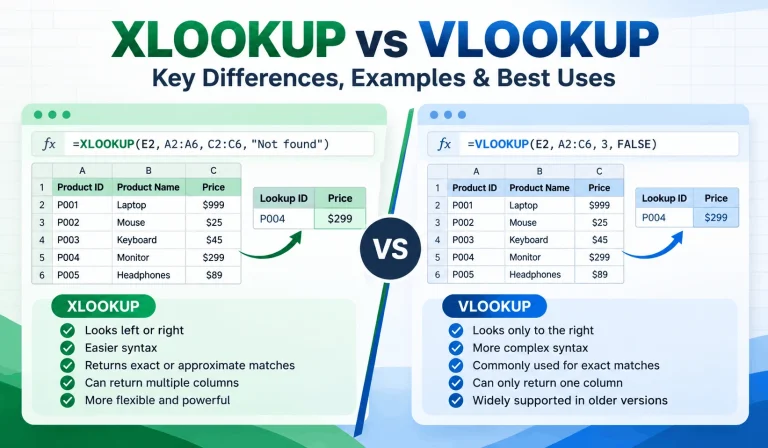
Finding one piece of information in a spreadsheet shouldn’t feel like searching for a needle in a digital haystack. Yet […]
Read article →
Ever spent 20 minutes searching for an AI conversation that took only two minutes to write? You’re not alone in […]
Read article →
Thinking about changing your hair color but worried you might regret it? We’ve all seen a gorgeous hair shade on […]
Read article →